FundRaiser Blog

The FundRaiser Software Blog is an excellent resource for nonprofit organizations looking to learn more about fundraising, donor management, membership management, and much more.

Converting In Kind Donors to Financial Supporters

Converting In Kind Donors to Financial Supporters

Dear Kim:

We are a 50-year-old social service agency mostly supported by government grants.  We do have about 600 donors who help us every year and we do a reasonable job keeping in touch with them.  We also have about 300 people who give us in-kind gifts and I have tried all kinds of solicitations to encourage them to give money as well as stuff, but I have had a really poor response. Someone said that you said in-kind donors often don’t become money donors. Is that true?  Should I stop trying to convert them? 

Continue reading
7756 Hits

Short Take: Coding In-Kind and Monetary Gifts

Short Take: Coding In-Kind and Monetary Gifts
b2ap3_thumbnail_ScreenShotmonetary2.jpg


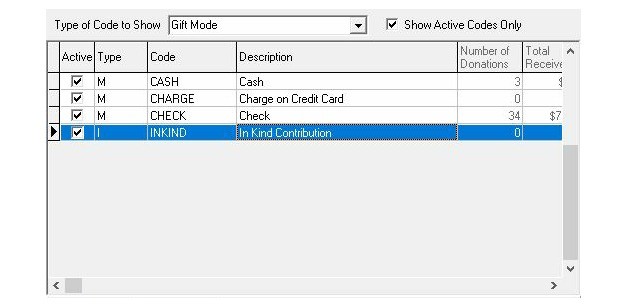
When inputting donations into your database, it’s important to differentiate in-kind gifts (which are usually goods, services, or time) from the financial gifts you receive. You get help doing this through the GIFT MODE code, which allows you to indicate the way the gift was received by your organization. With that code, you’ll notice that there are four default modes in the program: cash, check, charge, and in-kind.

Continue reading
7082 Hits

3 Important In-Kind Gift Entry Tips

3 Important In-Kind Gift Entry Tips
1.  Mode Code Denotes In-Kind or Monetary

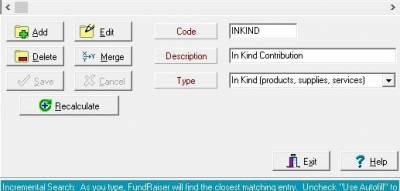
When entering a gift in FundRaiser, the Mode Code is used to differentiate not only between methods of payment (cash, check, charge, etc.) but also between monetary or in-kind donations. When you create a Mode Code you must specify whether that code will be monetary or in-kind. A Mode Code is always one or the other, and each gift requires a Mode Code. You may have multiple codes, as is usual in FundRaiser, which allows for specific types of in-kind donations. For instance, one of our users is a diaper bank, and, while they accept many infant-related types of in-kind donations, they need to keep diaper donations separated from others. The easiest way was to have, simply, a "diaper" Mode Code. When running various reports, you can specify to include monetary, or in-kind, or both types of donations. Use these codes to your advantage.  And check out the Coding & Spare Fields training video in the Customer Portal section of our website.

2.  Use the Merge Notes for Descriptions

On each gift record is a "Letter Notes for Merging" section. It is primarily used for notes that will then be merged into thank you letter templates. And for monetary gifts, these are usually personal greetings, of sorts, like "Gee, it was great to see you", or "Glad to see you've recovered from surgery", or something else to more personalize the thank you letter. For In-Kind donations, this is a great place to put a description of the items (or services) that were donated. It makes a permanent record as well as an easy way to pull that description in to a thank you letter.  More information on entering gifts is available in both the FundRaiser Overview and Recurring Gifts training videos available in the Customer Portal section of our website.


Continue reading
8830 Hits

How to Acknowledge and Recognize In-Kind Gifts

How to Acknowledge and Recognize In-Kind Gifts

When you receive gifts of products, time and services, be aware that your organization can be held in even greater regard by donors of such In-Kind gifts, should you express your gratitude in a meaningful way—in a manner far and above how these contributions are usually acknowledged by non-profit organizations. This can be accomplished in strict keeping with the applicable IRS rules and regulations, which are especially explicit when it comes to In-Kind gifts and how non-profits handle them.

By law, non-profit organizations cannot provide a donor with the dollar value of an In-kind gift. Such valuations when applicable, relative to "fair market value" of In-Kind gifts, need to be professionally assessed and certified elsewhere—if they can be—and that is the responsibility of the donor. This certification subsequently needs to be resolved with the professionals and others who prepare the donor's tax forms—whose work in turn will need to be reconciled with IRS regulations. In instances where time and service are donated, no tax break whatsoever is allowed, as the IRS Publication 526 clearly states, "You cannot deduct the value of your time or services…"

Continue reading
8874 Hits

Three Key Lessons I Learned About Volunteering When Disaster Struck

Three Key Lessons I Learned About Volunteering When Disaster Struck

Helping with Disaster Recovery in the Southern Ozarks, part 2

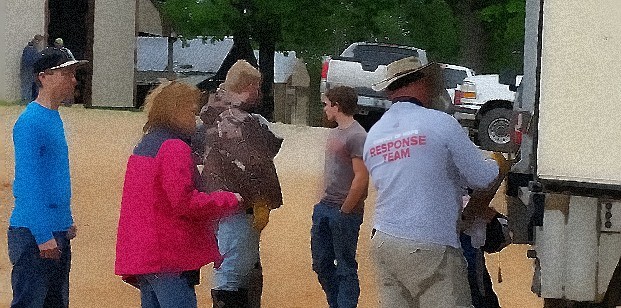
I usually report about nonprofit activity from the sidelines, but earlier this month massive flooding hit the area where I live. Over a period of 2 weeks, I experienced what it is like to live in a community affected by out-of-control weather.  Due to the efforts of compassionate and resourceful people in my community, a relief effort began immediately. I was fortunate to experience only minor direct effects from the flooding and so was free to volunteer. Now, three weeks later, I've learned many precious lessons about the blessings offered by rolling up your sleeves to volunteer where you can. I know that many of our FundRaiser customers are the front line in making this possible for people all over the world. Here are some key experiences things I learned that I'm grateful for: 

Continue reading
6648 Hits

Short Take: In Kind Donations

Short Take: In Kind Donations


When your organization takes in donations of good or services, how do you record that donation? On the Gifts tab, when you enter in a donation, the Gift Mode code reflects the form that the donation took—how the money was received or if it was an In Kind donation.  When you choose “In Kind” for your gift mode, this tells the database that the donation was received not as a financial transaction, but rather a donation of goods or services. The amount field can be the approximate value of those donations, and you can use your motivation and purpose codes to further categorize the donation.

Continue reading
5477 Hits

4 Steps to help convert Inkind to Monetary


In Kim Klein's recent blog, she mentions some very specific steps in winning over Inkind donors to become Monetary donors.  FundRaiser can help with these steps, and here's how:

1.  "Thank the donor for whatever they gave you".  You thank you letter can include the Gift Merge Notes field, which is where you should put a description of the goods or services donated.

Continue reading
12883 Hits

Converting In-Kind Donors to Financial Supporters


Dear Kim:

We are a 50-year-old social service agency mostly supported by government grants.  We do have about 600 donors who help us every year and we do a reasonable job keeping in touch with them.  We also have about 300 people who give us in-kind gifts and I have tried all kinds of solicitations to encourage them to give money as well as stuff, but I have had a really poor response.  Someone said that you said in-kind donors often don’t become money donors.  Is that true?  Should I stop trying to convert them? 

Continue reading
7086 Hits

In-Kind Gifts: How to Acknowledge and Recognize Them

In-KInd Gifts

When you receive gifts of products, time and services, be aware that your organization can be held in even greater regard by donors of such In-Kind gifts, should you express your gratitude in a meaningful way—in a manner far and above how these contributions are usually acknowledged by non-profit organizations. This can be accomplished in strict keeping with the applicable IRS rules and regulations, which are especially explicit when it comes to In-Kind gifts and how non-profits handle them.

By law, non-profit organizations cannot provide a donor with the dollar value of an In-kind gift. Such valuations when applicable, relative to "fair market value" of In-Kind gifts, need to be professionally assessed and certified elsewhere—if they can be—and that is the responsibility of the donor. This certification subsequently needs to be resolved with the professionals and others who prepare the donor's tax forms—whose work in turn will need to be reconciled with IRS regulations. In instances where time and service are donated, no tax break whatsoever is allowed, as the IRS Publication 526 clearly states, "You cannot deduct the value of your time or services…"

Continue reading
27037 Hits

3 Important FundRaiser In-Kind Gift Entry Tips


1.  Mode Code Denotes In-Kind or Monetary

When entering a gift in FundRaiser, the Mode Code is used to differentiate not only between methods of payment (cash, check, charge, etc.) but also between monetary or in-kind donations.  When you create a Mode Code you must specify whether that code will be monetary or in-kind.  A Mode Code is always one or the other, and each gift requires a Mode Code.  You may have multiple codes, as is usual in FundRaiser, which allows for specific types of in-kind donations.  For instance, one of our users is a diaper bank, and, while they accept many infant-related types of in-kind donations, they need to keep diaper donations separated from others.  The easiest way was to have, simply, a "diaper" Mode Code.  When running various reports, you can specify to include monetary, or in-kind, or both types of donations.  Use these codes to your advantage.  And check out the Coding & Spare Fields training video in the Customer Portal section of our website.

2.  Use the Merge Notes for Descriptions

On each gift record is a "Letter Notes for Merging" section.  It is primarily used for notes that will then be merged into thank you letter templates.  And for monetary gifts, these are usually personal greetings, of sorts, like "Gee, it was great to see you", or "Glad to see you've recovered from surgery", or something else to more personalize the thank you letter.  For In-Kind donations, this is a great place to put a description of the items (or services) that were donated.  It makes a permanent record as well as an easy way to pull that description in to a thank you letter.  More information on entering gifts is available in both the FundRaiser Overview and Recurring Gifts training videos available in the Customer Portal section of our website.

Continue reading
9052 Hits
Wait a minute, while we are rendering the calendar
donor slip banquet Tickles mode code entering auction gifts giving history updates security endowment campaign moves management new donors planning donor retention rate memorial giving donor engagement letter templates GivingTuesday new leadership targeted mailings In-Kind gifts anonymous donors Snow Birds Crowdfunding Campaign how to handle auction gifts training Thanksgiving capital campaign ROI gift entry motivation the Ask event management mailing new version major donors relationship tracking email customer service add ons Congratulations membership benefits pledges grants community broadcasting community arts nonprofits NCOA processing disaster relief tribute gifts fundraising letters increasing giving amounts giving levels building donor relationships board members FundRaiser Hosted Facebook volunteering word processor Thank You follow up in honor of donations merge fields donor prospects Company culture planned giving GoFundMe project Facebook campaign alumni membership programs letter spreadsheets office repeat donors gift notes field monthly giving social media holiday letters raffle flash sales segmenting donors Volunteer module solicitors #GivingTuesday features Excel FundRaiser Spark Reminders vacation donor targeting PayPal motivation code transparency major gift prospects data entry direct mail appeal letters fundraising Constant Contact ticketsales development director donor relations tax summary letters overview donation history donor advised funds user interface appeal accounting software happiness role of nonprofits new nonprofit legacy giving backing up data look and feel donor attrition online donations FundRaiser Basic new features large donations importing csv customer portal donor preferences brick campaign membersip benefits foundations passwords how-to videos lapsed donor data analysis adding personal notes to letters arts prospects New Year pictures Cloud corporate sponsors campaign product news government grants publicity materials budget thank you letters animal rescue donor loyalty nonprofit fundraising Network for Good community supported gardens announcements Codes custom page annual maintenance plan welcome packet holiday giving donor source gift acceptance policy donor attrition rate premiums operating systems upgrade volunteers texting donors donor retention salutation advanced tab donor recognition technical support support Alternative Addresses spare fields change of address updating phoning donors SYBUNTS user spotlights holiday Groupings merge notes data conversion Importing Data upgrading donors recurring gifts Personalizing Task List correspondance reports small donations donor charity golf tournaments tech tip National Change of Address donor contact information online donations operational costs Donor Portal End of Year Letters understanding giving trends Reporting to IRS training tip case study communications campaign management auction password protection on site training correspondence personalizing letters Resiliency LYBUNTS mission driven annual campaign donor profile general ticket sales grassroots campaign

Connect With Us

  800-880-3454 ext 3
  Email Us
  Request More Information
  Monday-Friday
      8:30AM-5:30PM CST

Customer Portal Login Form


The customer portal is unavailable. If you need support please reach out to support@fundraisersoftware.com Thank you.


  User Name:
  Password:

If you are not sure about your Customer User Name, please call 800-543-4131 and we will be able to help you.

Or you have lost your password, Request Password