Intuitive & Affordable

FundRaiser Software offers 3 powerful programs designed to fit any budget and any installation requirements

Tracking Tributes & Memorials

Keeping up with the details and responding in a timely manner to gifts donated in memory or honor of a person or pet can be a real challenge. The FundRaiser Tributes module helps you make sure you don't miss a step.

What you can do with the Tributes Module…

  • Make sure a notification letter goes out to family members of the honoree quickly after a memorial gift is received
  • Publicize your tributes program by easily creating lists of honorees and donors for your newsletter and website
  • Have the information you need for reports with easy-to-run and easy-to-update queries on all tributes or a particular memorial fund
  • Build donor loyalty by being able to separate donors of tribute gifts from your regular donors and send them different mailings

Memorial fundraising is a natural part of the plan if your organization works with dying people or animals. However, it presents particular organizational and communication challenges: several different letters may need to be sent promptly so honorees and family members are notified; and donors are thanked. This makes for satisfied donors, as well as publicizes your program and encourages more tributes. Recording all the necessary details promptly and correctly and making sure that the proper steps are taken with them can be tricky if you don't have the proper tools.

With the Tributes Module you can…

  • easily print notification letters to honorees and family members, specifying the names (and addresses and amounts, if desired) of the donors
  • easily merge a listing of honorees and donors into your newsletter
  • recording tributes is integrated into regular gift entry process, not as a separate process record multiple tributes from a single check
  • track and report on tribute details

Program Design, Ease of use, flexibility

Because ease-of-use and a short learning curve are so important to our users, Tributes management is integrated throughout FundRaiser. If you are already familiar with the FundRaiser interface, Tributes management will be a snap to learn. If you're new to FundRaiser we'll get you up to speed fast with our highly acclaimed training.

Campaign Management

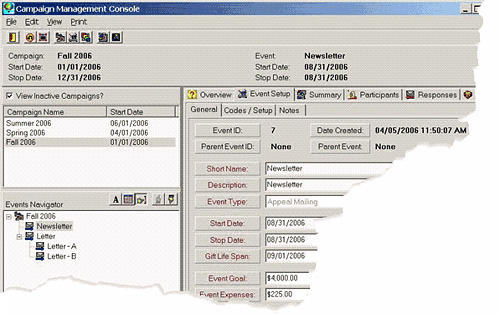
Campaign Management Console

Campaign Management in FundRaiser Professional helps you to streamline and improve your campaign development and execution. Whether your campaigns are the occasional appeal letter or complex events with multiple sub-events you will find what you need to organize the process in FundRaiser Professional.

Integrated Campaign Management can help you to –

  • Reduce Stress by helping you get more organized
  • Reduce Costs by avoiding false starts, reinventing the wheel, and last minute emergencies due to overlooked details
  • Save Time by keeping easy-to-understand records of campaigns all in one place, and also connected to your donor database
  • Determine your Most Effective Campaigns, Events, and Appeal Letters by easily comparing response rates and ROI (Return On Investment).
  • Know Who to Invite this year based on the history from past years
  • React to Change Faster by having comparison reports at your fingertips at all times
  • Collaborate with Others through shared access to campaign history and progress
  • Build on Past Success with extensive analytical reports

FundRaiser Campaign Management Screenshot


Features of Campaign Management

FundRaiser’s Campaign Management...

has been designed to help you face today’s tough challenges. It helps you to reduce costs and work with fewer resources while at the same time freeing you to move more efficiently, generate more donations, and increase donor loyalty. In addition, it provides specific comparative data on your campaigns, with the objective of measuring and comparing ROI, appealing to more qualified donors, and increasing donor loyalty, all while reducing costs.

What You can do with Campaign Management…

Send:

  • Invitations and Announcements by email and/or by printed letter or label
  • Thank You Letters to donors by email and/or print
  • Event Updates to staff and event volunteers

Track:

  • Participation: who was invited and who responded
  • Donations: who donated and how much
  • Tickets: both paid and complimentary tickets
  • RSVP’s and Reservations: who to expect at your event
  • Attendance: who actually did attend
  • Sponsorships: tracks sponsorships at different contribution levels, and the names of people who have been sponsored
  • Sub-Events: each event can be divided into sub-events
  • Response rates for each event and sub-event
  • Comparative ROI's (return on investment)

Event Giving Lifespan

Donors may respond to your campaign immediately or over a period of time. FundRaiser’s Event Giving Lifespan solves the problem of data entry operators forgetting to record a donation as a response to an event. During the setup of an event in FundRaiser, you simply designate the period of time during which you expect to receive donations (perhaps 30 days before an event to 30 days after). Then when a donation is received from one of the participants during the specified time period, FundRaiser will automatically offer to assign the donation to that event.

Reports:

  • Summary reports include gift and pledge totals, response rates, ROI, % of goal raised, average per response, and more on both the Campaign and the Event level.
  • Sponsorship Summary and Detail reports show packages purchased, gift and pledge totals, plus sponsorships, tickets, attendance, RSVP, and Reservations.
  • Participant Summary and Detail Reports show who gave to which events and the various ways in which they may have participated.
  • FundRaiser’s wide range of Standard Reports can also be used to report on event-related participation and donations.

Queries

FundRaiser’s amazingly simple "Groupings" capability enables you to select donors and participants based on current and past invitations, announcements, responses, and giving history concerning single or multiple events and campaigns. Use this list to send invitations and announcements for upcoming events or as prospecting lists for your sponsorship solicitors.

What Events it is used for…

FundRaiser’s Campaign Management is designed to be easy to use for simple events, and full-featured enough to handle complex campaigns.

It helps you determine the effectiveness of your basic fundraising activities:

  • Appeal letters
  • Newsletters
  • Phonathons and Sharathons

As well as help you organize and track the many activities usually found in more complex special events:

  • Golf tournaments
  • Auctions
  • Banquets

Who is this for…

The FundRaiser Professional program itself was designed with the simplicity needed to meet the needs of small and mid-size nonprofit organizations, and still have the power to accommodate the sophisticated requirements of large organizations. Available in single and multi-user editions, it's built-in security features let you manage user privileges and control access.

Whether you manage campaigns as part of your job or you are part of a multi-person campaign management team, FundRaiser Professional’s Campaign Management will help you do your job better and faster.

Program Design – Ease of use, flexibility…

Because ease-of-use and a short learning curve are so important to our users, we tightly integrated Campaign Management throughout FundRaiser. If you are already familiar with the FundRaiser interface, Campaign Management will be easy to learn. If you’re new to FundRaiser we’ll get you up to speed fast with our highly acclaimed training.


For more information, contact sales:
phone: 800-880-3454 Ext. 3

Resources

Our Lady of the Holy Spirit


Greater Cincinnati Behavioral Health Services


Wintix Intergration Module

Turn your ticket buyers into donors! Box office customers, who have already shown an interest in your organization, are ideal prospective donors. However, without an easy way of getting their names into your donor management software, you are faced with time consuming double-entry and other problems of hand data entry. The Wintix Integration module takes away these worries and makes it easy for your development staff to work with box office customer data.

What you can do with the Wintix Integration Module…

  • Automatically import Wintix box office customer names into FundRaiser, eliminating the need for double entry
  • Send targeted appeals to box office customers
  • Know which group to target for advertising when next production is coming up, based on past ticket buying habits
  • View both ticket buying and giving history for a each donor in a single record
  • Have excellent communication tools for corresponding both by email or mail
  • Track special benefits offered with ticket promotions or memberships

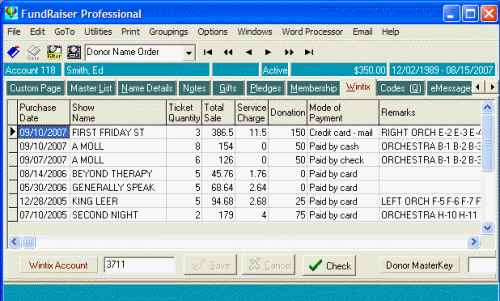
Screenshot

By integrating FundRaiser with Wintix box office software, you get the benefit of using two full-featured programs for both your ticketing and fundraising needs, while avoiding the problems and inconvenience of double entry of your data. This module is an integration package, rather than the actual ticket-sales program itself. It integrates with Wintix, Tixsales, and Webtix versions 3 and 4 from Center Stage Software. New: FundRaiser will now integrate with Wintix Version 5. Read More to see how.

With the Wintix Integration Module you can…

  • Eliminate duplicate box office customer entries in both Wintix and FundRaiser
  • Import names, addresses, and giving history from Wintix into FundRaiser
  • View a customer's ticket history in FundRaiser
  • Automatically generate and personalize letters to ticket buyers
  • Create segments of your mailing list from ticket buying history
  • Update data in both directions between FundRaiser and Wintix
  • Include both Wintix and FundRaiser data in a single backup operation
  • run queries of Wintix data from within FundRaiser, in combination with FundRaiser data (people who bought tickets during the past two years who have not yet donated)

Program Design, Ease of use, flexibility

Because ease-of-use and a short learning curve are so important to our users, imported Wintix data is integrated throughout FundRaiser. If you are already familiar with the FundRaiser interface, then imported data will be a snap to use. If you're new to FundRaiser we'll get you up to speed fast with our highly acclaimed training.

For more information, contact sales:
phone: 800-880-3454 ext. 3
email: This email address is being protected from spambots. You need JavaScript enabled to view it.

Resources

Peninsula Players

Irish Repertory Theatre

Are You Contacting Your Best Donor Prospects?

Households Now Available

Many of our customers have been asking for a feature that will allow them to split families into households so they can report on the individual members' activities, and view contacts separately, yet still treat them as a single record at other times. We are pleased to announce that this feature is available in Version 4.5 released February 14, 2011.

Households is available as a standard feature in both FundRaiser Select and Professional, meaning that, if your organization has a current Annual Maintenance Plan, this new feature is free.

In Professional, Households is also designed to integrate with the Relationships feature, so you can see who your donors are related to and who they know at a glance.

Take a Video Tour of Households

camera

The screenshot below provides a Sneak Peak of the new Households feature.

Households Panel in Professional-Click to Enlarge

Here are some of the details:

arrow Household information has been integrated into Reports and Groupings, making it simple for you to see activity (giving, volunteering, membership, etc), by Household or individual.

arrow It is simple to split a single donor/spouse record into a Household of two records.

arrow You can mail once to the entire Household or individually to each Household member.

arrow If you are using duplicate account numbers to track members of a Household now, per our suggestion, a single click will convert your data into the new Households feature.

arrow You can easily add or remove a donor from a Household.

arrow The Household panel can be viewed from any screen in FundRaiser, or just from the Master List.

arrow In Professional, Households integrate with Relationships, showing both in one convenient Household panel.

How can you get it?

If you are a current FundRaiser Select or Professional user with a current Annual Maintenance Plan, you are entitled to receive this feature absolutely free! Simply watch your email for our monthly newsletter; each newseltter highlights the newest updates to the software. Or, check the Customer Portal for updates. The Customer Portal always has the most-recent version, along with the update notes.

If you are a current Select or Professional user but your AMP has expired, you will need to renew before you can install this update.

Contact your Sales Representative for an invoice by calling 800-880-3454 ext. 3

Pledge Management

Pledges are one of the most effective ways to increase donations and donor loyalty. The challenge is keeping track of who owes what and when, and following up accordingly. The details can quickly become unmanageable without the proper tools.

What you can do with the Pledge Module…

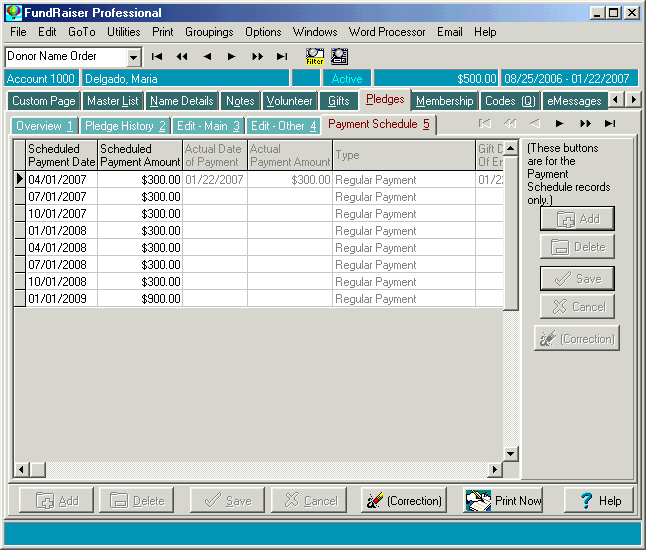
  • Quickly lay out any payment schedule
  • Keep track of which payments are due or overdue
  • Keep pledges coming in with timely thank you, reminder, and overdue letters
  • Get an overview of a campaign
  • Easily accommodate pledge changes, due to late, skipped, or other variations to the original promise

A pledge is a promise to pay a certain amount of money over time. What would be too much money to give in one lump sum becomes manageable when broken down into payments. In addition, regular giving, even in small amounts, increases the bond between a donor and the organization. Donors who pledge their gifts tend to contribute two to three times as much as donors who make one cash payment, and stay loyal to an organization for longer.

With the Pledge Module you can…

  • Map out payments for any schedule
  • Record all details of a pledge, including total pledge, size of payments, schedule of payments, and length of pledge commitment
  • Designate codes to show which fund the pledge goes to, what motivated the pledge, and who solicited the pledge
  • Assign appropriate correspondence, such as thank you, reminder and overdue letters
  • Generate reports on pledges paid, projected income, and more

Program Design, Ease of use, flexibility

Because ease-of-use and a short learning curve are so important to our users, pledge management is integrated throughout FundRaiser. If you are already familiar with the FundRaiser interface, pledge management will be a snap to learn. If you're new to FundRaiser we'll get you up to speed fast with our highly acclaimed training.


Making Phonathons Work for You

This free program was written with the needs of community-supported radio and TV stations in mind.

FundRaiser Phonathon is used to display the current phonathon totals in big bold numbers on the screen to make it easy for the announcer to read from. Totals are shown for the entire period, today, yesterday, this hour and last hour. Additional sub-totals can be shown for two user-defined "groups", like New/Renewal or Day Partner/Monthly Giver/One-Time.

Telephone operators take down the details of the donations and pledges (name, address, credit card number, phone, etc, etc), either on paper or with one of our other FundRaiser programs.

If using paper, then the operators next enter the donation details into FundRaiser Phonathon. If using another FundRaiser program, then the details are automatically entered into the Phonathon program for them.

As the donations are entered, the program displays the phonathon totals and sub-totals in large bold numbers on the screen so that the on-air person can glance at the totals to announce how they are doing. S/he can also easily read details of the most recent donations, including any comments.

As with other FundRaiser programs, FundRaiser Phonathon has been designed to be very easy to use so that your volunteers can be trained in 10 minutes to use the program.

The Setup section provides a way for you to totally redefine the two sub-total Groups, create your own list of Payment Modes (how the phonathon pledger will pay), and decide which data entry fields will be required, and which are optional. There is also a multi-user option that enables up to 5 workstations to synchronize their phonathon entries, so that all workstations automatically display current totals and all entries.

There is a simple report that prints the details and all the totals and sub-totals. The report can be run for any time period, and can be printed, or exported to MS-Excel, pdf, rtf, or a number of other formats.

A standard Windows Help file comes with the program to explain operation and multi-user setup.

Solutions for Community-Supported Radio and TV

FundRaiser Software has been serving community-supported radio and TV stations since the 1980's with easy to use donor management software and friendly support.

Besides the normal fundraising functionality that we put in all three of our main FundRaiser donor management programs, you will be especially interested in the following special modules and programs:

  • Premiums Module This module is ideal for those who give premiums in return for donations. It prints shipping labels, handles out-of-stock items, and includes several helpful reports. Does your staff dread the phone calls that inevitably come in after a phonathon? You know, the pledgers wondering when they will get their coffee mug or CD? Now, with FundRaiser's Premiums module, you can quickly look up the caller, either on-screen or on a report, to see when their premium was shipped. No more stalling or guessing.

    This module has a simple inventory program that keeps track of how many of each premium you have in-stock and how many have been promised to pledgers, so you can order more in time to fill all the requests. It will not print a shipping label if items are out-of-stock. It also won't print a label until you indicate that payment has been received. It can even handle the cases where the donor picks up their premium in person.

  • Memberships Module This is an absolute must for all community-supported radio and TV stations who want to turn sporadic donors into consistent donors. It enables you to treat your donors as true members or subscribers, each with their own individual expiration/renewal date. It gives you the tools to build a great membership program based on benefits and clear cut-off dates, but with the flexibility to handle unusual situations.

    Printing membership renewal letters is a snap. You do so each month by telling FundRaiser to print for everyone with an expiration date a month or so (your choice) in the future. Or you can wait until after your phonathon to mail only to those who failed to renew during the campaign. You can even mail to all your subscribers, telling them of the upcoming phonathon and offering to cancel it if everyone gives early.

    Of course, printing newsletter labels is also simple. Just print for all active (non-expired) members.

    Wonder how effective your membership campaign has been the last 12 months? Run an analytical report which breaks down New, Renew, Rejoin, and Lapsed members into a wide variety of coded segments.

    Default membership renewal dates can be set to fit anyone's pattern, and even then you can overwrite the default date for a special case. You can require a specific membership dues amount or accept any amount over some minimum ($5, $30, or more).

  • Free FundRaiser Phonathon Program This free program is used to display the current phonathon totals in big bold numbers on the screen to make it easy for the announcer to read from.

    Totals are shown for the entire period, today, yesterday, this hour and last hour. Additional sub-totals can be shown for two user-defined "groups", like New/Renewal or Day Partner/Monthly Giver/One-Time.

    This free program can be run on its own, or in conjunction with one of our FundRaiser programs.

Modules are available as options in FundRaiser Select, and are included as standard in FundRaiser Professional.

Remember, we offer a variety of programs and payment options to fit every budget!

Volunteer Management

In Today's Economy, Managing Volunteers Well is Vital

Skillfully manage the time that volunteers donate to your organization with the full-featured Volunteer Management module in FundRaiser Select and Professional. For organizations that are working with several volunteers, these features help smoothly weave together volunteers' needs, skills, and schedules, with the jobs you need to get done.

What the Volunteer Management Module can do for you…

  • Schedule volunteers for the jobs they request and are good at
  • Get an overview of the hours volunteers have available to match them to the jobs you need to schedule
  • Build and schedule teams of compatible volunteers
  • Report on the value of volunteers to your organization, including volunteer hours in terms of dollar equivalents (especially important for grant applications).

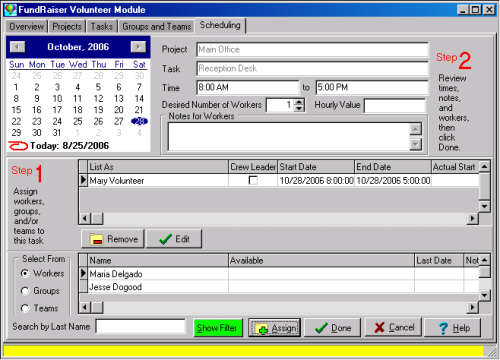
Schedule volunteers in FundRaiser

With the Volunteer Management Module you can…

  • Schedule a larger number of volunteers
  • Schedule volunteers based on interests and skills; team or group membership
  • Show times available for work
  • Quickly get volunteer reports; tally up volunteer time by individual, task, or project,   or total for year; set a monetary value for hours worked by task, individual,   project, and more
  • Specify projects and tasks
  • Track volunteer status such as active, crew leader, evaluation done; and work history,  such as date last volunteered, mileage, hours worked
  • Print welcome and work evaluation letters

Program Design, Ease of use, flexibility

Because ease-of-use and a short learning curve are so important to our users, we tightly integrated Volunteer Management throughout FundRaiser. If you are already familiar with the FundRaiser interface, Volunteer Management will be a snap to learn. If you're new to FundRaiser we'll get you up to speed fast with our highly acclaimed training.

For more information, contact sales:
phone: 800-880-3454 ext 3
email: This email address is being protected from spambots. You need JavaScript enabled to view it.

Premiums Management

Premiums Management Made Easy

Premium gifts require special handling-- you have hundreds of little this’s- and- that’s to keep track of and get out to your donors. The accuracy and timeliness with which you do this reflects back on your organization. It can be overwhelming. The FundRaiser Premiums module helps get the chaos under control without you missing a step.

What you can do with the Premiums Module…

  • Send out the correct premium to the correct donor, in a timely fashion
  • Make wise choices about which premiums to buy and in what amount by being able to easily evaluate the popularity and cost of specific premiums
  • Easily respond to donor inquiries about their premium by being able to check the status of premium delivery and inventory

Premiums can inspire donors to give, particularly in on-air fundraising drives used by community radio and TV stations. However, they also cost you money and time. Careful management and evaluation of the success of any given premium program is needed to make sure that what you are offering is worth the effort. For these things you need the proper tools to help.

With the Premiums Module you can…

  • Track all the specifics of premium products-- amount of inventory on hand, where products are stored, their supplier, fair market value and your last cost
  • Link premiums to giving levels
  • Manage premiums from the donor's regular gift page-- choose correct premium, associate multiple premiums to a single gift
  • Print labels with donor address and correct premium(s) to send to donor
  • Link donation payment to premium delivery- send if paid or hold until payment is received
  • Track correct donor preferences on premium delivery-- mail or in-person pickup
  • Print out status report that shows all premiums that have been ordered during a time period, for use by staff who don't have access to FundRaiser. Useful for handling phone or drop-in inquiries.

Program Design, Ease of use, flexibility

Because ease-of-use and a short learning curve are so important to our users, Premiums management is integrated throughout FundRaiser. If you are already familiar with the FundRaiser interface, Premiums management will be a snap to learn. If you're new to FundRaiser we'll get you up to speed fast with our highly acclaimed training.

For more information, contact sales:
phone: 800-880-3454
email: This email address is being protected from spambots. You need JavaScript enabled to view it.

Subcategories

Products

Products Overview

The FundRaiser Family is a collection of three intuitive donor management programs, all of which can be installed locally or hosted for secure online access. Our software offers users the peace of mind that comes with knowing that sensitive donor data is well-protected from potential problems.

All three FundRaiser programs "climb the ladder" of capability and sophistication. You can start at the level that is appropriate for you now, and upgrade later as your organization and needs evolve. Upgrading is easy and economical; your data converts from one program to another in a simple and quick operation and 100% of your previous purchase is applied to the cost of the next program.

FundRaiser Professional (interest-free installment plan available) is our flagship program, and the real workhorse of the Family. It contains dozens of powerful, easy-to-build reports, merge functions, and enhanced Grouping criteria. User-defined fields make the sorting and reporting functionality virtually limitless. Professional boasts powerful features not found in any other FundRaiser program.

FundRaiser Select (interest-free installment plan available) features unlimited coding, extensive data fields, powerful Query flexibility, built in reports, a top-notch word processor, and a multi-user option. Select is designed to grow with your organization by offering the flexibility to build upon its features and functionality with a full suite of expansion modules.

FundRaiser Expansion Modules are included in FundRaiser Professional and are available as optional expansions to FundRaiser Select to customize your application.

Using any of the FundRaiser programs will help you to grow. By increasing the time you have to devote to direct fundraising, it helps you to increase your contributions. As both you and your organization grow, the decision to step up to the more sophisticated features and techniques of the next FundRaiser programs will be a natural progression.

All our programs are guaranteed... if after giving it a good try, you're not happy with a FundRaiser program, send it back for a full refund. We are dedicated to giving you what you need to make your fundraising work easier and smoother.

Case Studies
Is FundRaiser donor management software right for you? Will it solve the particular problems facing your organization? The following case studies cover a wide variety of organizations and fundraising activities, and show how many of the features of FundRaiser work in real life situations.

See Also:

www.americanbear.org

American Bear Association

When Carolyn Malcolm became Program Coordinator for the American Bear Association, its membership numbers were not increasing. “Our membership numbers were holding fairly steady, but they weren’t increasing like they should have been. New members were replacing ones that didn’t renew. The problem was that we didn’t have a renewal system in place. People didn’t know to renew so we were loosing too many old members,” recalls Carolyn.

The American Bear Association maintains a sanctuary where visitors can observe bears in the wild. Members help support the educational mission of promoting a better understanding of bears. “We have membership levels: $30 for a basic membership, $100 for the next level, and $250 for the top level,” says Carolyn.

The organization was using FundRaiser Basic. Carolyn looked it over and decided they needed something more. “We send out a newsletter four times a year and I couldn’t find a convenient way to keep track of expiration dates in Basic. For that reason, we upgraded to FundRaiser Select,” Carolyn says.

Moving from Basic to Select

The data moved well from Basic to Select. The automatic duplicate record checking in Select helped catch extra records. “There were lots of multiple entries, so having those pointed out has helped. The data was put in interestingly because we have so many people working in the database. I’ve been manually fixing it. Other then that, the move went smoothly.”

Membership is climbing

With FundRaiser Select, the American Bear Association has been able to keep track of membership renewal dates, and send timely reminders. “Now we put expiration stickers on the newsletter when a member’s term is up. We have gotten a lot of positive feedback about that. Memberships have been increasing since we’ve started. Select is working.”

Says Gina Mankus, office manager for the American Bear Association, “For many members, it’s been three years since they signed up. The stickers are getting them back.”

Returning members make up for economic downturn

Increased membership renewals are closing the gap left by impact of the poor economy. “Expiration stickers are making up for the losses brought on by the economy,” says Carolyn. Gina agrees. “We aren’t getting many new members because of the economy, but the renewal stickers have really helped. Now we’re increasing our membership,” says Gina.

Connect With Us

  800-880-3454 ext 3
  Email Us
  Request More Information
  Monday-Friday
      8:30AM-5:30PM CST

Customer Portal Login Form


The customer portal is unavailable. If you need support please reach out to support@fundraisersoftware.com Thank you.


  User Name:
  Password:

If you are not sure about your Customer User Name, please call 800-543-4131 and we will be able to help you.

Or you have lost your password, Request Password