Intuitive & Affordable

FundRaiser Software offers 3 powerful programs designed to fit any budget and any installation requirements

FundRaiser Hosted

How it works:

We request a backup of your data and upload it to our secure server. You install a small program called GoGlobal, which gives you a direct, secure connection to your database online. You can install GoGlobal on an unlimited number of computers and devices, including Macs and most mobile devices. To access your software online, simply login to GoGlobal and you 're there. We will update it for you automatically as we release new versions and will also create backups for you automatically.
Securely Hosted

Call now to set up your new FundRaiser Hosted account: 800-880-3454 ext 3

A hybrid of the installed and online options, the hosted version allows you to purchase the software license and pay FundRaiser a low monthly to host it online for you. You get the best of both worlds: you own the license for the software and can take it offline at any time, but you get the ease of online access, Mac-compatibility, and reduced IT load on your organization.

  • FundRaiser Spark Hosted
  • License: $649 (single-user only)
  • Setup: $99
  • Monthly fee: $49
  • Donor Portal: $349 setup + $9.95 monthly
  • Annual Maintenance Plan:
    Included
  • FundRaiser Select Hosted
  • License: $1400
  • Setup: $195 for 1st user + $95/add'l user
  • Monthly fee: $95 for 1st user + $25/add'l user
  • Annual Maintenance Plan:
    Included
  • Donor Portal: $349 setup + $9.95 monthly
  • *Add-on Modules: $300 one-time
  • **Integration Modules: See below
  • FundRaiser Professional Hosted
  • License: $3800
  • Setup: $195 for 1st user + $95/add'l user
  • Monthly Fee: $95 for 1st user + $25/add'l user
  • Annual Maintenance Plan:
    Included
  • Donor Portal: $349 setup + $9.95 monthly
  • *Add-on Modules: Included
  • **Integration Modules: See below

* Add-On Modules include: Membership Management, Pledges Management, Tributes Management, Volunteer Management, Premiums Management, Phonathon, and Product Sales. With Select Hosted, you can purchase as many modules as you like and host them for no additional fee.

** Integration Modules include: Wintix Integration. Please note that QuickBooks Integration is not available for our hosted editions.

FundRaiser Online

Securely Hosted

How it works:

FundRaiser Online is the perfect option for new customers. Here, you will select the product you are interested in: FundRaiser Spark, FundRaiser Select, or FundRaiser Professional. Each of our three programs are available online, giving you the best of both worlds: low start-up costs and secure online access to your software.

Call now to set up your new FundRaiser Hosted account: 800-880-3454 ext 3

For convenient online access and Mac-compatibility, combined with low start-up costs, the online version is the way to go. Lighten the IT load on your organization with automatic software updates and regularly-scheduled automatic backups.

  • FundRaiser Spark Online
  • Setup: $69 (single-user only)
  • Monthly fee: $69
  • Annual Maintenance Plan:
    Included
  • Donor Portal: $395 + $9.95 monthly
  • FundRaiser Select Online
  • Setup (2 Users): $179
  • Monthly fee: $179 each
  • Annual Maintenance Plan:
    Included
  • Donor Portal: Included
  • *Add-on Modules: $10/module/month
  • **Integration Modules: See below
  • FundRaiser Professional
  • Setup (Unlimited Users): $349
  • Monthly Fee: $349 each
  • Annual Maintenance Plan:
    Included
  • Donor Portal: Included
  • *Add-on Modules: Included
  • **Integration Modules: See below

* Add-On Modules include: Membership Management, Pledges Management, Tributes Management, Volunteer Management, Premiums Management, Phonathon, and Product Sales. With Select Online, you can add as many modules to Select as you like for only $10 per month each.

** Integration Modules include: Wintix Integration. Please note that QuickBooks Integration is not available for our online editions.

Product Sales Module

Detailed Product Sales Tracking

The Product Sales Module is designed for those who have a catalog of products to sell. It produces invoices and helpful reports. It handles partial shipments, backorders, and gift orders with ease. It's also easy to combine a product sale with an extra gift - just ask if the purchaser would like to round the amount of the order up to an even number (like $50) - the difference is a tax deductible donation.

This module works particularly well for nonprofit radio and TV stations who track inventory during their Pledge Drives. It tracks detailed inventory, and also keeps a complete history of all products sold to donors and members.

FundRaiser Modules

Modules are sets of specialized features that focus on a particular aspect of fundraising or nonprofit management. These modules are built right into the FundRaiser Select and Professional programs (they are not available for FundRaiser Spark) -- unlike other companies that also offer modules, there are no external programs that you have to start separately from the main program.

In FundRaiser Select , these modules are optional. This enables you to selectively purchase all the functionality you need without paying for more than you need. Modules may be included with your initial purchase, or later with a simple phone call.

In FundRaiser Professional all modules are included as standard and can be turned on and off with a single click. The prices shown apply only to purchasers of FundRaiser Select.


QuickBooks® Integration Volunteer Management Product Sales
Pledges Memberships Premiums
Tributes Wintix Integration Phonathon
Star Donor Integration Campaign Management Relationship Management


• Campaign Management This feature is for Professional only.
Streamline and improve your campaign development and execution. Track participation, donations, tickets, RSVP's, attendance, sponsorships. Analyze and compare your campaigns to build on past success. Whether your special events are the occasional appeal letter or complex campaigns with multiple events you will find what you need here. Learn more about Campaign Management.

• Relationship Management This feature is for Professional only.
Track and sort any type of relationship between your donors; family, business, personal, etc. Critical during networking activities, particularly when trying to see whom an important contact might have a relationship with. Create groupings based on shared relationship, such as relationships to lapsed donors or major donors and merge relationship information into reports and donor profiles.

• QuickBooks® Integration
This module enables FundRaiser to "talk" to QuickBooks so that when you enter a donation or pledge in FundRaiser, it is automatically entered into QuickBooks for you. Please note that the ability to import from QuickBooks is a standard import option in both FundRaiser Select and Professional, and does not require the use of this module. The module is needed only to send FundRaiser data to QuickBooks. Learn more about the QuickBooks Integration Module.

• Pledges
These are for donors who make multi-payment pledges, like $3,000 over 4 years, with $200 payments made each quarter and a final balloon payment of $800 (or as simple as $20/month for a year). You choose which pledgers should receive reminder letters or overdue notices. Reports include a status report, an income projection report, a statistical report, and a campaign (pledge and gift) report.Learn more about Pledges Management.

• Tributes
This is for organizations who have in-memory-of or in-honor-of gifts. With it, you record not only who gave, but in whose memory or honor it was given, and who the donor should be acknowledged to (often the surviving spouse). It's easy to print those acknowledgment letters, specifying the names (and addresses and amounts, if desired) of the donors. It's also easy to print or create a file containing a listing of honorees and donors in a format suitable for pasting into a newsletter. Learn more Tributes & Memorials.

• Star Donor Integration
Offer your donors the convenience of donating on your website anytime they are inspired to do so. This module fully automates the process of accepting and recording online donations by sending an email to FundRaiser's Inbox, which is parsed and inserted into the proper record. The module integrates directly with popular credit card processor Star Donor. Learn more about Star Donor Integration.

• Volunteer Management
Perfect both for volunteer-driven nonprofits and for those with less sophisticated efforts. Track volunteer status and work history. Schedule individuals, groups, or teams based on their skills and availability. Print welcome and work evaluation letters, and generate a variety of reports for efficient management. Learn more about Volunteer Management.

• Memberships
This is for membership-based organizations, especially for those whose expiration dates are scattered throughout the year. It makes it easy to send out renewal letters a month or so before their expiration date. It's also especially easy to print labels for newsletters and other membership mailings. Reports include a status report, a statistical report, and a 4-year comparison report. Learn more about Membership Management.

• Wintix Integration
Turn your ticket buyers into donors! This module is for theater groups who sell tickets to their performances. It is an integration package, rather than the actual ticket-sales program itself. It integrates with Wintix and Tixsales from Center Stage Software. The integration software automatically updates in two directions, from FundRaiser to Wintix, and from Wintix to FundRaiser. The module also enables you to view past ticket purchases from within FundRaiser, and includes Wintix data in FundRaiser backups, if desired. You can also run queries (we call them Groupings in FundRaiser) of Wintix data from within FundRaiser, in combination with FundRaiser data (people who bought tickets during the past two years who have not yet donated). (This module does not include the cost of Wintix software. Module works for Wintix versions 3,4 and 5. Click4Tix and Webtix are NOT currently supported) Learn more about Wintix Intergration.

• Product Sales
This is for those who have a catalog of products to sell. It produces invoices and helpful reports. It handles partial shipments, backorders, and gift orders with ease. It's also easy to combine a product sale with an extra gift - just ask if the purchaser would like to round the amount of the order up to an even number (like $50) - the difference is a tax deductible donation.

• Premiums
This module is ideal for public radio and TV stations who give premiums in return for donations. It prints shipping labels, keeps track of out-of-stock items, and includes several helpful reports. Learn more about Premiums Management.

• Phonathon
Perfect for radio stations or organizations that have phonathons or sharathons. Set goals for the day, hour or a specified period and track the gifts that are pledged toward these goals. Displays the totals in a format that is easily read by the on-air talent. Learn more about Phonathons.

Multi-User Options

FundRaiser on your Network

Not sure about the difference between "networkable", "multi-user", and "client/server"? See below for a plain-English explanation.

For those of you with local-area networks (LANs) who need to have more than one person running FundRaiser at the same time, you'll want to consider the multi-user version of FundRaiser Select or Professional. (FundRaiser Basic is not available in a multi-user version. It can be installed on a network, but only one user can access it at a time.)

The multi-user version employs "record locking", so that up to five users can be operating the program at the same time without concern for what others are doing. You can also run the regular (single-user) version on a network, but you must coordinate your usage with other people because only one person can be in the single-user version at any one time.

For those who need more than five users in FundRaiser at a time, or who want the increased security, speed, and stability of a client/server version, we can offer it in sizes of 1, 2, 5, 10, 25, 50 or more users. We chose the Advantage Database Server by Extended Systems for its reliability, low cost and simple operation. The prices given in Pricing for the client/server version of FundRaiser include both the FundRaiser program and the client-server engine as a single package.

What does Multi-User mean exactly?

First, let's get the licensing issue clear, and then define a few terms... All versions of FundRaiser come with an organizational license. This means that you can run FundRaiser on as many computers as you wish so long as all copies are used for the benefit of the purchasing organization. Therefore, you can buy one copy and run it at home, and on several computers at the office. Now, on to those terms...

  • A Network is two or more computers that are connected together so that they can share files and/or printers.
  • Networkable or Network-compatible means that a program can be run across a network... it can be installed on one computer and run from another. This is especially useful for database programs like FundRaiser because it means that everyone using the program will be working on the same set of data. All FundRaiser programs are networkable.
    Without networking, each computer would have its own copy of the program with its own set of data. Then when one person makes an update, it is NOT seen on the other computers. So, typically, only one person is allowed to update (everyone else just does lookups and reports), and that one person gives everyone else a backup copy of her data at the end of the day.
    With networking, everyone can be sharing the same database. So one person's update will be seen by everyone else.
  • Single-user means that only one person can be using the program at any one time. If someone else wants to use it, the other person has to first close the program. This is fine for some smaller organizations. FundRaiser Basic is single-user only.
  • Multi-user means that more than one person can be using the program at the same time. The program uses a series of "locks" to maintain order, but the users of the program usually don't see any of that. They just use the program as if no one else was in it. This is great because anyone can make updates and additions, and the other users will see those changes without having to do anything special. Both FundRaiser Select and Professional are available in 5-user multi-user versions. (5-user means that a maximum of 5 people can be using it at any one time.... It can be installed on any number of workstations on the network, but only 5 can use it at a time.)
  • Client/Server is essentially a heavy-duty multi-user system. Like the multi-user approach, the data is loaded on one central computer, called the Server. However, when a user runs the program, it does not open the files directly. Instead, the server opens the files on behalf of the client (the user at the workstation) and provides whatever data from the files that they need. When the user makes changes, their program sends those changes back to the server, which inserts it into the data files for them.

FundRaiser Client/Server also offers the following benefits:

  • Data integrity. If a workstation on a multi-user system crashes or locks up, it can cause the data that it shares with the other users to become corrupt. At best, this will cause other users to lock up. At worst, data will be lost. Most often, it is only the index files that become corrupt. Even when the data itself becomes damaged, it can usually be fixed without loss of data, but it is still annoying and time consuming.

    With c/s, the workstation never really has the files open itself, so the data is never affected by a lockup or crash. And, if the server itself goes down, it has built-in failsafes that will automatically restore the data back to the last complete transaction.

  • Speed. Because only the data that is needed is sent to the client (workstation), there is less traffic across the network wires, so everything goes faster. Much faster.
  • Remote Access. Access FundRaiser from home or on the road from your laptop using Terminal Services. The Client/Server license is required for remote connection.
  • Security. Additional security measures can be taken on the server to protect the data against intrusion or theft.

Both FundRaiser Select and Professional have 1, 2, 5, 10, 25-user (and more) client/server versions.

We use the Advantage client/server engine from Extended Systems. We chose it because it is simple, low-cost, and very easy to install and maintain. Read this Client/Server White Paper for a somewhat more technical explanation of Client/Server. The document is in pdf format, which requires Adobe Acrobat to read.

Read about how ClientServer helped the Siena/Francis House.

Using FundRaiser Software on Your Network

FundRaiser Software is fully 'network-able', meaning that it can be installed to a single location on a Local Area Network (LAN) and accessed from other computers on the network. Our software is used successfully in many different network environments. However, since networks vary greatly, we cannot guarantee that our software will work within your particular network. We encourage prospective customers to install the evaluation copy of the software for testing on your network prior to purchase. If you experience network problems we can offer advice, but you will need to get help from your local network technician.

Membership Management

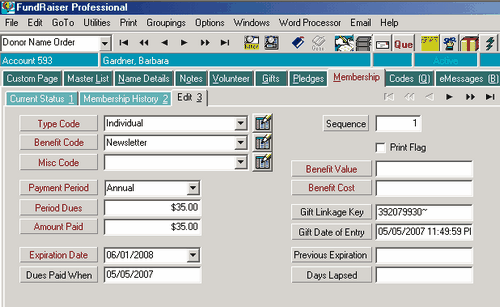
Offering a membership in your organization to your donors helps you increase loyalty and turn sporadic donors into regular givers. However, management of membership expiration dates, solicitation and renewal letters, and membership benefits adds another level of details that require up to date follow-through. Achieve great results with the FundRaiser Memberships module along to help you.

What you can do with the Memberships Module…

  • Automatically track expiration dates
  • Easily handle membership correspondence including membership renewals, solicitations, and lapsed member letters
  • Personalize your communications so members feel more appreciated
  • Target mailings to segments of your membership to maximize response and minimize your costs
  • Monitor and report on the progress of membership drives and membership level changes as frequently as you want
  • Show appreciation to member solicitors for the specific members they motivated to join

Manage Memberships in FundRaiser

Membership in your organization can increase the loyalty of regular donors by making them feel like part of the team. In addition, regular membership renewals can turn occasional donors into regular givers. However, membership management can be challenging, especially with expiration dates scattered throughout the year, or for organizations with several membership levels and a variety of benefits. To make membership management a powerful way to accomplish your mission, put FundRaiser's Memberships module to work for you.

With the Memberships Module you can…

  • Set membership levels (Corporate, Individual, Family, etc.)
  • Assign benefits to each level
  • Automatically generate and personalize membership letters (solicitations, renewal, thank you, etc.)
  • Create segments of your mailing list from donor membership and giving history
  • Automatically print mailing labels
  • Run comprehensive membership reports

Program Design, Ease of use, Flexibility

Because ease-of-use and a short learning curve are so important to our users, Membership management is integrated throughout FundRaiser. Also, just like our other modules, Memberships features customizable fields to make the module work seamlessly with your established organizational needs. If you are already familiar with the FundRaiser interface, the Memberships module will be a snap to learn. If you're new to FundRaiser we'll get you up to speed fast with our highly acclaimed training.

For more information, contact sales:
phone: 800-880-3454 ext 3

Subcategories

Products

Products Overview

The FundRaiser Family is a collection of three intuitive donor management programs, all of which can be installed locally or hosted for secure online access. Our software offers users the peace of mind that comes with knowing that sensitive donor data is well-protected from potential problems.

All three FundRaiser programs "climb the ladder" of capability and sophistication. You can start at the level that is appropriate for you now, and upgrade later as your organization and needs evolve. Upgrading is easy and economical; your data converts from one program to another in a simple and quick operation and 100% of your previous purchase is applied to the cost of the next program.

FundRaiser Professional (interest-free installment plan available) is our flagship program, and the real workhorse of the Family. It contains dozens of powerful, easy-to-build reports, merge functions, and enhanced Grouping criteria. User-defined fields make the sorting and reporting functionality virtually limitless. Professional boasts powerful features not found in any other FundRaiser program.

FundRaiser Select (interest-free installment plan available) features unlimited coding, extensive data fields, powerful Query flexibility, built in reports, a top-notch word processor, and a multi-user option. Select is designed to grow with your organization by offering the flexibility to build upon its features and functionality with a full suite of expansion modules.

FundRaiser Expansion Modules are included in FundRaiser Professional and are available as optional expansions to FundRaiser Select to customize your application.

Using any of the FundRaiser programs will help you to grow. By increasing the time you have to devote to direct fundraising, it helps you to increase your contributions. As both you and your organization grow, the decision to step up to the more sophisticated features and techniques of the next FundRaiser programs will be a natural progression.

All our programs are guaranteed... if after giving it a good try, you're not happy with a FundRaiser program, send it back for a full refund. We are dedicated to giving you what you need to make your fundraising work easier and smoother.

Case Studies
Is FundRaiser donor management software right for you? Will it solve the particular problems facing your organization? The following case studies cover a wide variety of organizations and fundraising activities, and show how many of the features of FundRaiser work in real life situations.

See Also:

www.americanbear.org

American Bear Association

When Carolyn Malcolm became Program Coordinator for the American Bear Association, its membership numbers were not increasing. “Our membership numbers were holding fairly steady, but they weren’t increasing like they should have been. New members were replacing ones that didn’t renew. The problem was that we didn’t have a renewal system in place. People didn’t know to renew so we were loosing too many old members,” recalls Carolyn.

The American Bear Association maintains a sanctuary where visitors can observe bears in the wild. Members help support the educational mission of promoting a better understanding of bears. “We have membership levels: $30 for a basic membership, $100 for the next level, and $250 for the top level,” says Carolyn.

The organization was using FundRaiser Basic. Carolyn looked it over and decided they needed something more. “We send out a newsletter four times a year and I couldn’t find a convenient way to keep track of expiration dates in Basic. For that reason, we upgraded to FundRaiser Select,” Carolyn says.

Moving from Basic to Select

The data moved well from Basic to Select. The automatic duplicate record checking in Select helped catch extra records. “There were lots of multiple entries, so having those pointed out has helped. The data was put in interestingly because we have so many people working in the database. I’ve been manually fixing it. Other then that, the move went smoothly.”

Membership is climbing

With FundRaiser Select, the American Bear Association has been able to keep track of membership renewal dates, and send timely reminders. “Now we put expiration stickers on the newsletter when a member’s term is up. We have gotten a lot of positive feedback about that. Memberships have been increasing since we’ve started. Select is working.”

Says Gina Mankus, office manager for the American Bear Association, “For many members, it’s been three years since they signed up. The stickers are getting them back.”

Returning members make up for economic downturn

Increased membership renewals are closing the gap left by impact of the poor economy. “Expiration stickers are making up for the losses brought on by the economy,” says Carolyn. Gina agrees. “We aren’t getting many new members because of the economy, but the renewal stickers have really helped. Now we’re increasing our membership,” says Gina.

Connect With Us

  800-880-3454 ext 3
  Email Us
  Request More Information
  Monday-Friday
      8:30AM-5:30PM CST

Customer Portal Login Form


The customer portal is unavailable. If you need support please reach out to support@fundraisersoftware.com Thank you.


  User Name:
  Password:

If you are not sure about your Customer User Name, please call 800-543-4131 and we will be able to help you.

Or you have lost your password, Request Password